Frequently Asked Questions
Easy Release ™ for iPhone, iPad and ANDROID!
*click on the question to reveal the answer!
- Q: Who can benefit from using Easy Release (Pro)™?
- A: The short answer is probably everyone eventually! Professional (portrait, stock, wedding, corporate, architectural) photographers certainly would use it all the time, but also real-estate brokers, dentist/doctors offices, public relations, corporate communications, marketing and human resources departments, or anyone who may need more than just "editorial" or "private use/display" rights to an image at some point. If you publish (put on your website or other marketing materials) images of people you photograph, then you need Easy Release (Pro)™
- Q: Do the major stock photography agencies accept Easy Release releases?
- A: Getty Images, iStockPhoto, Shutterstock, BigStock, Dreamstime, Dissolve, 500px, Stocksy, Alamy and many others have publicly stated they accept releases generated by Easy Release (Pro). We suggest you contact your agency directly to find out for yourself.
- Q: Are Model and Property releases the same as Photo or Image releases?
-
A: No, they are completely different. A model release is for a person (the subject of an image) to waive their personal right to profit from their own likeness,
allowing a photographer (and assigns) to profit from the model's likeness, without further compensation to the "model" or subject. For a Property release, the property owner
is waiving their rights to profit from the image of their property in a particular set of photos.
Photo or Image releases are for the purpose of licensing or otherwise "permitting the use" of a photograph given by the photographer and/or copyright holder who is waiving or permitting rights to use the copyrighted image in some way, like publishing or other public display. - Q: GDPR - General Data Protection Regulation
-
A: *The following represents our current understanding of the situation as of 6/25/2018.
1. We do not collect data on a server component of our own. All data remains in the app on your device and optionally in your cloud services.
2. When Easy Release transmits data to cloud services like iCloud-Drive, Google-Drive and Dropbox, it does so using transport layer security (TLS) like SSL/HTTPS encryption. This secure transport is also commonly used by modern email implementations these days but that's the choice of the user.
3. Mobile devices are not publicly facing servers and therefore not subject to the same standards of “reasonable security” that would be required of these servers. That said, iOS and Android devices are (or can be made) very secure -- www.apple.com/business/docs/iOS_Security_Guide.pdf and source.android.com/security/encryption/ -- and famously: en.wikipedia.org/wiki/FBI–Apple_encryption_dispute – as they use very high end encryption.
4. Here are, we believe relevant clauses that seem to indicate not much if anything, has changed with regards to releases.
https://ico.org.uk/for-organisations/guide-to-the-general-data-protection-regulation-gdpr/lawful-basis-for-processing/contract/
https://ico.org.uk/for-organisations/guide-to-the-general-data-protection-regulation-gdpr/lawful-basis-for-processing/legitimate-interests/
- Q: Not working properly or not starting up or black screen
-
A:
(for iOS)
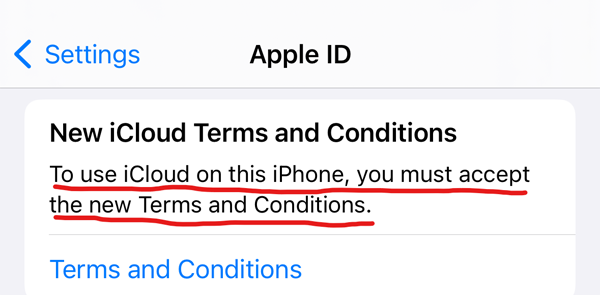
Make sure you have accepted the NEW Apple iCloud Terms and Conditions in the iOS Settings, under your Apple ID.
Verify ALL the following settings on your device(s):
iOS Settings--> iCloud--> Account : re-set to your account & password
iOS Settings--> iCloud--> iCloud Drive : ON
iOS Settings--> iCloud--> Easy Release : ON
iOS Settings--> scroll down to Easy Release, go into menus and ENABLE all options.
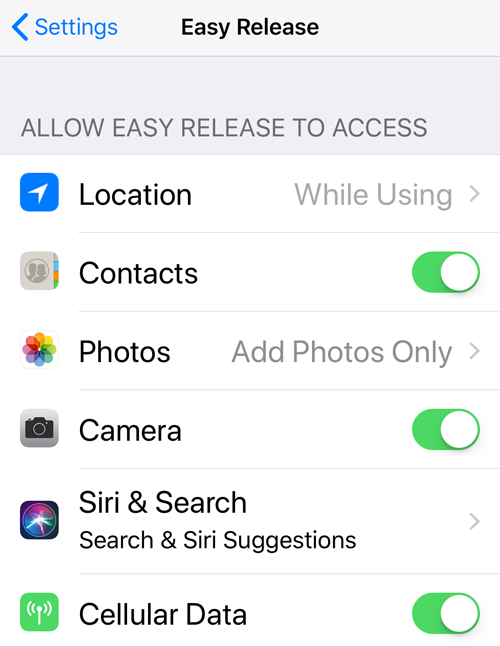
Then enable Use-iCloud in the Easy Release Settings
A: (for ANDROID)
Go to Android Settings --> Apps --> Easy Release --> Permissions --> allow ALL of them.
Also, make sure the SD card if you have one isn't full or locked.
IMPORTANT: Easy Release will only work from the main/primary account.
Sometimes your email app needs permission to access "temp space" to get PDF files from Easy Release:
Go to Android Settings --> Apps --> {YOUR EMAIL APP} --> Permissions --> allow ALL of them.
- Q: Email Issues: Not sending or never received, stuck in outbox, etc.
-
A: ( for iOS )
1. Easy Release doesn't send the email itself, it requires the iOS Mail app, which must be configured with a valid email account and ability to send. Third party email apps are not supported by iOS for developer integration use at this time.
2. Sometimes when there is more than one email account configured on your iOS device the default can be set to the wrong one.
On the device, go to Settings --> "Mail, Contacts, Calendars" --> touch "Default Account" and change it to another one. This has no effect other than to change which email account is used by third-party apps.
3. If you deleted the built-in iOS Mail App, you will have to reinstall it for Easy Release to be able to send email. iOS doesn't make it possible to integrate with third party email apps in any reasonable way.
A: ( for Android )
1. Easy Release doesn't send the email itself, it requires an email app be configured with a valid email account and ability to send.
2. Sometimes the wrong app gets set to be the "default" sending app and you want to change it: Settings --> Apps --> Easy Release, delete default setting.
3. Gmail App not attaching JPG: The issue is that the Gmail App isn't asking for the correct permissions.
If you go to Settings-> Apps-> Gmail-> Permissions and enable the "Storage" permission manually, then it should work. - Q: Android Backup/Restore Issues
-
A: Many users have not been able to get the Google Drive/Android Automatic backup and restore functionality to work properly, while other seemingly have had no issues.
We don't know why this is so, but we would like to share an alternative solution that some users have reported to us as successful.
We offer this third-party solution as an option to try at your own risk without endorsement nor support.
Helium Desktop (Mac and Win) Installer and Android App Instructions
- Q: Obtaining a Remote Signature
-
A: While there is currently no "built-in" way to get remote signatures with the app, there are still great ways to accomplish this using standard device features in iOS or third-party solutions in ANDROID. Of course, the best way is to get the releases signed in-person when the model is right in front of you of course but, you can also do what you are asking in a couple of different ways.
We specifically designed Easy Release to be compatible with hybrid digital/analog release workflows. You can output the release PDF at any point of completion by touching the "Created: ..." button near the bottom of the release summary, then the email button.
APPLE iOS has a "markup" feature in the Mail app which allows people to add a signature to PDF's they receive in Mail:
--------------------> https://support.apple.com/HT206885
ANDROID has similar functionality via the free Adobe Reader app:
--------------------> https://www.adobe.com/devnet-docs/acrobat/android/en/signing.html
- Q: Microstock.Plus / StockSubmitter Data Integration In-App Purchase, what is it?
-
A: This feature embeds the release data into the JPEG(of the PDF), to speed up data input when using Microstock.Plus or StockSubmitter platforms, by allowing them to autoload it into their submission tools.
--------------------> https://microstock.plus/
--------------------> https://stocksubmitter.com/
*We have no affiliation with these companies other than having created this in-app purchase feature to benefit our mutual users. If you are having trouble with this feature for either of these applications, please contact their respective support. Our responsibility is embedding the data -- loading it in their interface is their responsibility.
- Q: How can I verify that the Stocksubmitter/MicrostockPlus data is in my JPEG?
-
A: We have made a test utility here: https://easyreleaseapp.com/jpegcheck/
Privacy Note: no data is transmitted to our server, the tester runs completely on the client-side (in your browser) without server communication.
- Q: How do I migrate my data from Easy Release to Easy Release Pro (Android only!)
-
A:
Easy Release (Android) → Easy Release Pro (Android)
The Menu now has an option to "Export"
(an encrypted-archive-file will be saved as: "releases.zip" to your device's "Downloads" folder)
and the new "Easy Release Pro" has an "Import" button. It's that simple!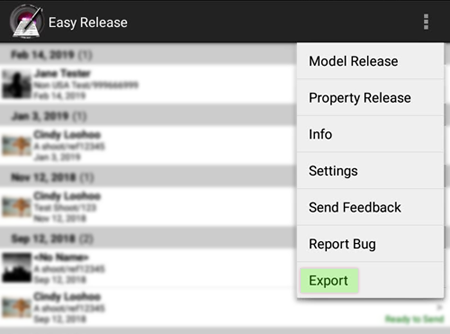
- Q: Free custom release templates links (ASMP and Others!)
-
A: We've begun compilling a list of Easy Release (Pro) compatible custom release templates you can import from this page:
https://applicationgap.com/templates/
- Q: What's the best way to get a new feature(s) I'm requesting?
-
A:
New features are added based on demand and financial feasibility. We don't discuss publicly when and what we are doing in advance but the best way for a user to help us add more features is to increase our overall store rating, write positive reviews, and most of all share with your social networks your use and endorsement of Easy Release with links to our website https://easyreleaseapp.com/ This helps us grow our business and enables further investment in the product. Additionally it helps combat the few but vocal users who think that damaging a company's store rating will get them new features.
We've been providing Easy Release since 2010 on both iOS and Android. We've been endorsed by pretty much every stock photo agency, and some even only allow our app for model release creation. All this said, it's still a very small "niche" market. Help us help you!
- Q: "Restore Purchases" button for iOS In-App purchases missing?
-
A:
Sorry for that, we don't know (but are working on it) why that "restore purchases" button doesn't always show up in the Easy Release settings.
You shouldn't hesitate to go through the Apple purchase path again to re-enable your In-App purchases as you would never be charged more than once for any purchase made with the same iTunes user credentials. - Q: My agency now requires that I sign each time, contemporaneously with the model and witness, can this work with Easy Release?
- A: Yes, absolutely, you must simply remove your stored signature from the "Photographer information section" in the Easy Release Settings. Easy Release will now have you (the photographer) sign each time ahead of the model and witness.
- Q: Can I backup/sync with iCloud? (iOS Only!)
- A: YES, you can sync: releases, models, locations, settings, custom-templates and branding across ALL your iOS devices and the PDF files are saved to a folder in iCloud-Drive.
- Q: Can I use Dropbox or other cloud services?
- A: YES, both our iOS and Android versions can auto-save PDF and JPEG files to Dropbox, OneDrive and GDrive
- Q: Is Easy Release functional off-line with no Internet access?
- A: YES, completely. Easy Release is fully functional off-line. You should even email the releases when off-line because all we do is queue them up in your email app's outbox so they will send automatically once connectivity is restored.
- Q: How do I purchase the Advanced Customization Pro-Pack "In-App Purchase?"
-
A: You are not prompted to purchase until you try to use one of the advanced features.
All of the new features are found via Easy Release >> Settings >> Release Legal Text Defaults >> choose "Model" or "Property" >> If you don't have a custom version, you can create one by touching "+" on the Versions screen.
Now all the new features are on this screen and touching them prompts you to purchase. - Q: Can I install Easy Release (Pro) on multiple devices without being chanrged again?
- A: YES, all devices which are managed by the same AppStore/PlayStore account can share app purchases. This also applies to the in-app purchases.
- Q: I bought it for my Android, do I have to buy it again for my iPad/iPhone, etc (and vice-versa)
- A: Yes. While the two versions share an overall design and workflow they are different apps, required a completely separate development effort and they are sold on our behalf by unrelated retailers Apple and Google.
- Q: Can I re-send an email?
- A: Select the release from the main screen list, then on the release summary page scroll all the way down to the PDF section and touch the area that says "Last Sent MM/DD/YY ##:## AM/PM" which will popup the "You, Model or Both" dialog and then the email client page. Otherwise, you can also touch the "Created:..." button and then on the PDF preview page touch the "Outputs" button at top-right to get the Print or Email menu.
- Q: Do you store my release information on your servers? This would not be acceptable for privacy/security reasons.
-
A: Easy Release is a completely off-line app. WE have no connection to your data in any way.
We built all the functionality into Easy Release to make it a self-contained and standalone app.
This was more difficult than just putting all the PDF creation, release management, distribution and other heavy lifting on a server but much more secure for you and your clients.
- Q: How do I add/enter a custom release text?
-
A: (iPhone) Custom model or property releases can be added from the settings menu
in as many versions as you wish. The release text can be typed in
directly but the best way is to prepare the text in an email to
yourself, then copy-paste it into Easy Release. You can select which
model/property release version to use on a per-release basis.
The steps for adding a custom release are as follows: Settings >> Release Legal Text Defaults Section >> Touch either model or property standard >> touch Edit >> then "+" to add new >> type a name and title text for your new release >> then type or paste legal text.
A: (ANDROID) You can import text file from SD card (easy!) or you can copy/paste it (a little harder), here's how - step-by-step:
To get some text in the clipboard 1. Unlike iPhone, most of the email programs on Android do not allow you to copy text from received emails.
2. To get around this, send yourself the release text in an email as an attached text file, rather than in the body of the email.
3. If you select the attached file once you receive it on your Android device, Android will try to launch any installed app that is registered to edit text files.
4. Most text edit programs do allow you to copy the contents of text files they open, so use your text editor to do this. Often long- pressing on the text will bring up a context menu with a Copy option. (free software "TxtPad Lite")
Steps in Easy Release for Android (assuming you have text in clipboard)
1. Open App
2. Menu -> Settings
3. Tap on Model or Property in the Release Legal Text Default section
4. Tap on the plus icon in lower right (to add new custom release)
5. Tap on "Legal Text" field, to select it and bring up the keyboard.
Then you can either
6a. Long-press on the "Legal text" field again to bring up context menu with Paste option
or
6b. Menu -> Paste Over, which will replace the contents of the Legal Text field with whatever is in the clipboard
- Q: What size should my custom logo be?
-
A: You can try anything you want because Easy Release will resize and then you can output a test release PDF to see how it looks/prints.
But if you really want to know the gritty details of sizes and aspect ratios, here you go:
Max height: 120 pixels - Max width: 1716 pixels
This is "scaled down" (not resized) in the PDF to a maximum of 20x286 pixels for display. - Q: Which languages are supported in Easy Release?
-
A: iOS and Android Easy Release Pro (v3.4+) Release PDF's can be produced in English, Spanish, French, Swedish, German, Italian, Japanese, Russian, Polish, Chinese (simplified), Chinese(Taiwan) and Portuguese (European and Brazilian), Dutch, Danish, Finnish, Norwegian.
UI Localization: iOS and Android Easy Release Pro (v3.4+) UI: German, Spanish, Italian, Japanese, French and Swedish. - Q: Can I add my own legal text?
- A: YES, you can create as many custom release template versions as you like.
- Q: Is there a user manual?
- A: There is in-context help throughout the app. On most screens you can find an info (i) button to access a help text that relates to the page you are viewing. *ANDROID: the (i) button is accessed from the menu button.
- Q: What about my language "XXXXX" Can I do the translation for you?
- A: We use a professional translation service and will add new languages as demand dictates.
- Q: Why is Easy Release better than its competitors?
- A: Ultimately you must be the judge of that, but we would say it’s because of the many professional touches, our exhaustive list of exclusive features and our commitment to continue to add to them! Our longevity (since early-2010) and ubiquitous institutional adoption is probably the best testament.
DISCLAIMER: we are not lawyers and this is not legal advice, if you have legal concerns about using Easy Release for your business, please consult your own legal counsel.